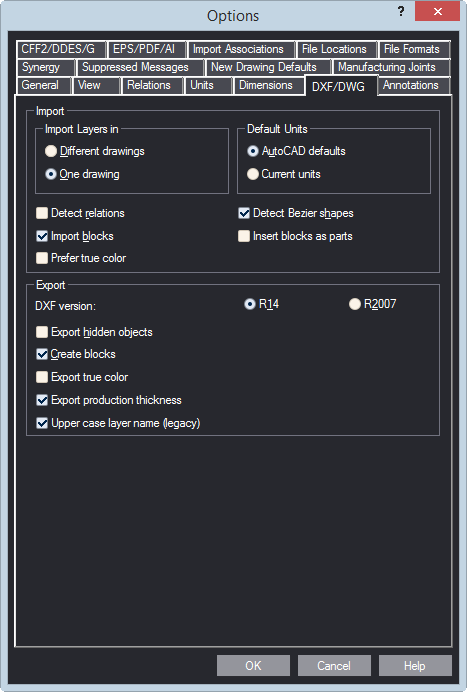
| Import | Options that control the import of AutoCAD DXF files into Prinect. |
|---|---|
| Import layers in | Options for how to import the layers of a DXF drawing: as separate drawings or as a single drawing. |
| Different drawings | Imports each layer of the DXF drawing as an individual drawing. |
| One drawing | Imports the layers of the DXF drawing into a single drawing. |
| Default Units | Choose which measurement units to use when importing a .dxf drawing. |
| AutoCAD defaults | Imports the .dxf drawing with the measurement units that were applied when the file was created. |
| Current units | Imports the .dxf drawing with the measurement units set in Prinect. |
| Detect relations | The imported drawing takes account of any relations between the objects. |
| Import blocks | The imported drawing takes account of any blocks in the source .dxf file. |
| Prefer true color | The imported drawing treats colors according to the RGB display mode and not according to a color look-up table. |
| Detect Bezier shapes | Displays the available Bezier shapes in the .dxf files. If the check box is empty, Prinect reduces polylines and Bezier curves down to sequences of simple objects — most often, arcs and lines. |
| Insert blocks as parts | The imported drawings has any .dxf blocks as individual parts. |
| Export | Options that control the export of Prinect files into .dxf files. |
| DXF version | Select the AutoCAD version to which you want Prinect to export files. |
| Export hidden objects | Exports hidden objects along with the drawing(s) into the .dxf file. |
| Create blocks | Creates DXF blocks in the exported .dxf file. |
| Export true color | Colors are exported according to the RGB display mode and not according to a color look-up table. |
| Export production thickness | Exports the thickness set for production purposes. IMPORTANT: By default, the check box is selected. Clear it if you plan to use the exported DXF/DWG drawings in Adobe Illustrator. This guarantees that no structural problems will arise when you open the exported drawings in Illustrator. |
| Upper case layer name | Select this check box to use uppercase names for the layers in the exported .dxf drawing. |