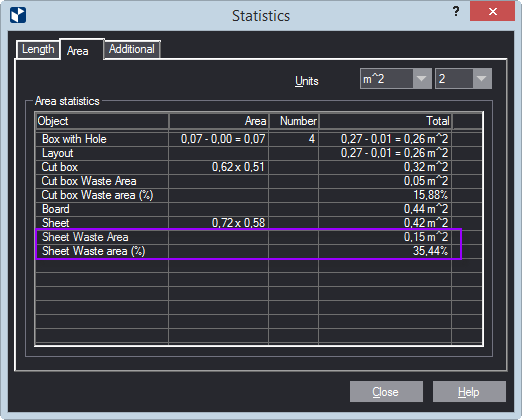
| Units | Sets the measurement units for displaying values in the table. |
|---|---|
| (Precision) | Sets how many decimal places will be displayed in values in the table. |
| Area statistics | Information about the types of objects, how many they are, and the areas they fill. |
| Object | Lists the objects for which statistics are given — for example, board, sheet, cut box, 1up, waste area. If the active drawing does not contain a certain type of object, the type does not appear in the list. |
| TYPES OF OBJECTS | |
| (1up Name) | Displays in:
|
| Layout | The layout area equals the areas of all the 1ups minus the combined area of their holes. See an example of how these areas are indicated. (Opens in a separate window.) |
| Cut box | Cut box is formed by:
|
| Cut box waste area | This area is calculated according to the formula:
NOTE: If the 1up contains holes, their combined area is not counted as waste. See an example of how these areas are indicated. (Opens in a separate window.) |
| Cut box waste area % | The cut box waste area displayed as a percentage of the cut box area. See an example of how these areas are indicated. (Opens in a separate window.) |
| Board | If the drawing contains a board, its area is displayed. |
| Sheet | If the drawing contains a sheet, its area is displayed. |
| Sheet Waste Area | This area is calculated according to the formula:
NOTE: The combined holes area of the 1ups is not counted as waste. |
| Sheet Waste Area % | The sheet waste area displayed as a percentage of the sheet. See an example of how these areas are indicated. (Opens in a separate window.) |